
The nudge
Whichever channel carries it, the nudge is a short notice with a link: it names you, says what happened, and does not contain the update itself.
On WhatsApp and by text, what happened is the order’s status, in words BeaconBox writes, never yours: “Your order #A-10294 from PhonicBloom has shipped.” There is one such sentence for each status (confirmed, shipped, ready for pickup, delivered, cancelled, refunded, delayed). The WhatsApp message adds “Tap the button below to see the details.”, a button to open the inbox, and a small footer saying replies are passed to you. A text drops your name, then the order number, when they would not fit in one text, and without a status it just says there is a new order update.
That is a deliberate limit, not a simplification. Email is read over somebody’s shoulder on a train, a text shows on a lock screen, and a WhatsApp message sits in a thread a family shares. None of those is a safe place for an order’s contents, so none of them carry it.
It also means a small set of approved templates serves every shop, which is what makes the channels affordable and, on WhatsApp, what makes them possible at all. It is also why WhatsApp needs an order number and a status on the update: without them there is no approved sentence to send.
The inbox
The link signs your customer in. There is no password step, no verification code and no account to create: the link carries a single-use token, and following it opens their inbox.
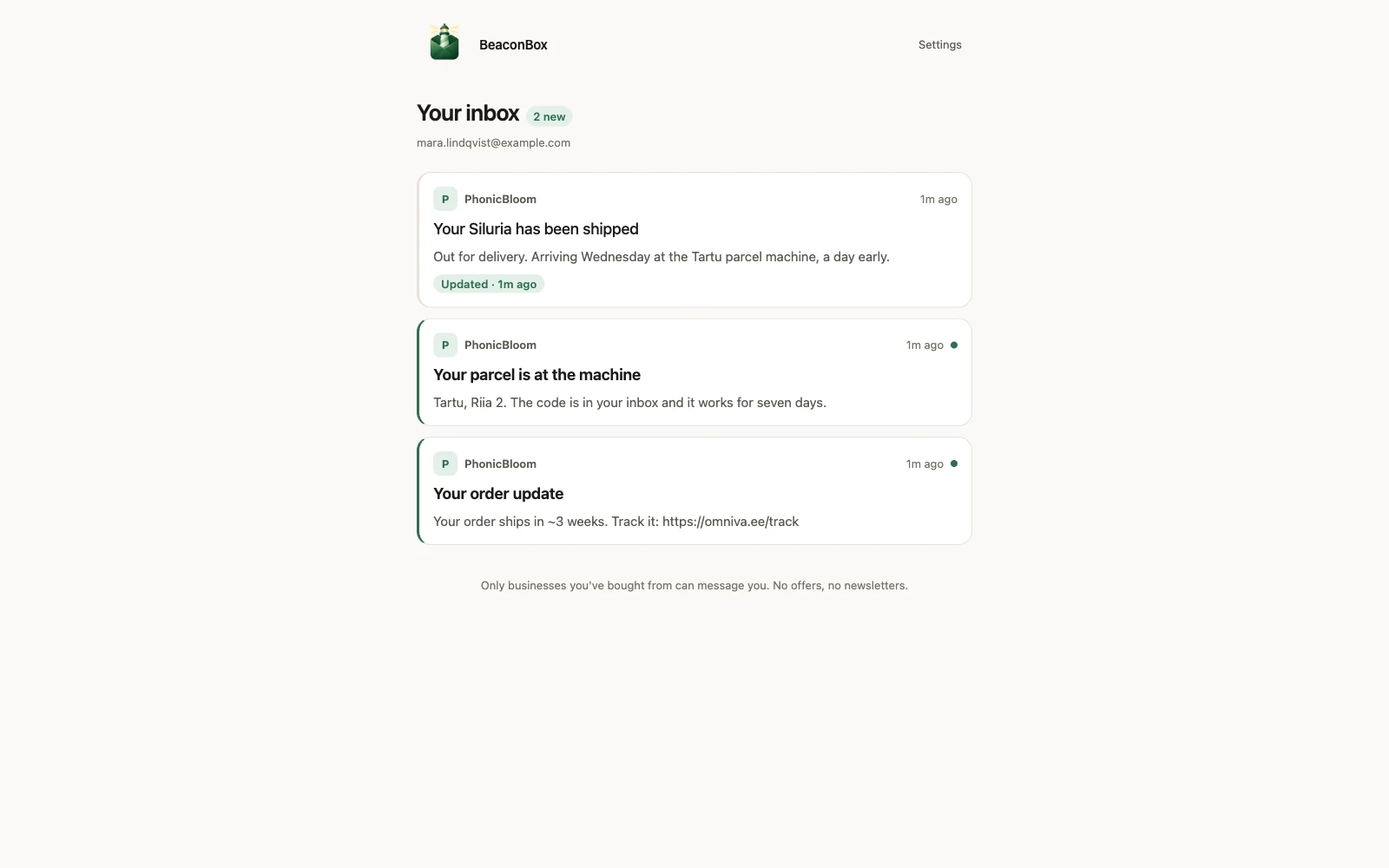
A few things follow from the inbox being shared across businesses:
- Your customer sees your updates alongside other shops’ updates. They do not see anything of yours in another shop’s view, and no shop can see your customer list.
- An update you have replaced is greyed out, not deleted, so the sequence still reads.
- An update you take back is marked as withdrawn. It does not vanish, because a customer who read it ten minutes ago would otherwise think they imagined it.
A nudge link is single use and expires after 14 days; the sign-in it gives lasts 30. Somebody past both, opening an old email on a device that never signed in, is offered a form to post their own address and gets a fresh link emailed to them. That one lives an hour.
They never need you for this, which is the point: a customer who cannot get back into their inbox is otherwise waiting for you to message them again.
How they reach you
The nudge email and every update page end with a line about who to contact. By default that line is ours, and it tells your customer only that the inbox does not take replies.
You can make it yours. In Settings, switch on Enable contact footer and supply a business name and a business email, and both surfaces end with this instead:
If you have any questions or concerns, you can reach Phonic Bloom Support at help@phonicbloom.com.
The name is usually whoever answers mail, not the name on your updates, so “Phonic Bloom Support” is a better answer than “Phonic Bloom”. On the update page the address is a link your customer can tap.
The sentence itself is fixed and you cannot edit it. You supply the two values. That keeps the one line your customer reads at the end of an order update from becoming somewhere to advertise, which is the thing that would stop these messages being worth opening.
It reaches WhatsApp too. When a customer writes to the number your updates come from, the automatic answer tells them their message was passed to you and, when we hold their email address, that any answer will come by email. It also offers your address, so the one switch covers all three places a customer might try to reach you. Switch it off and none of them publish it.
Set it per business. The footer belongs to one account, so the switcher has to be on a specific business and not on “All businesses”. Changes are recorded in the audit log, which is how “when did we start sending people to that address” stays answerable.
What your customer controls
Every customer has a settings screen listing every business that has messaged them and what each one is allowed to send.
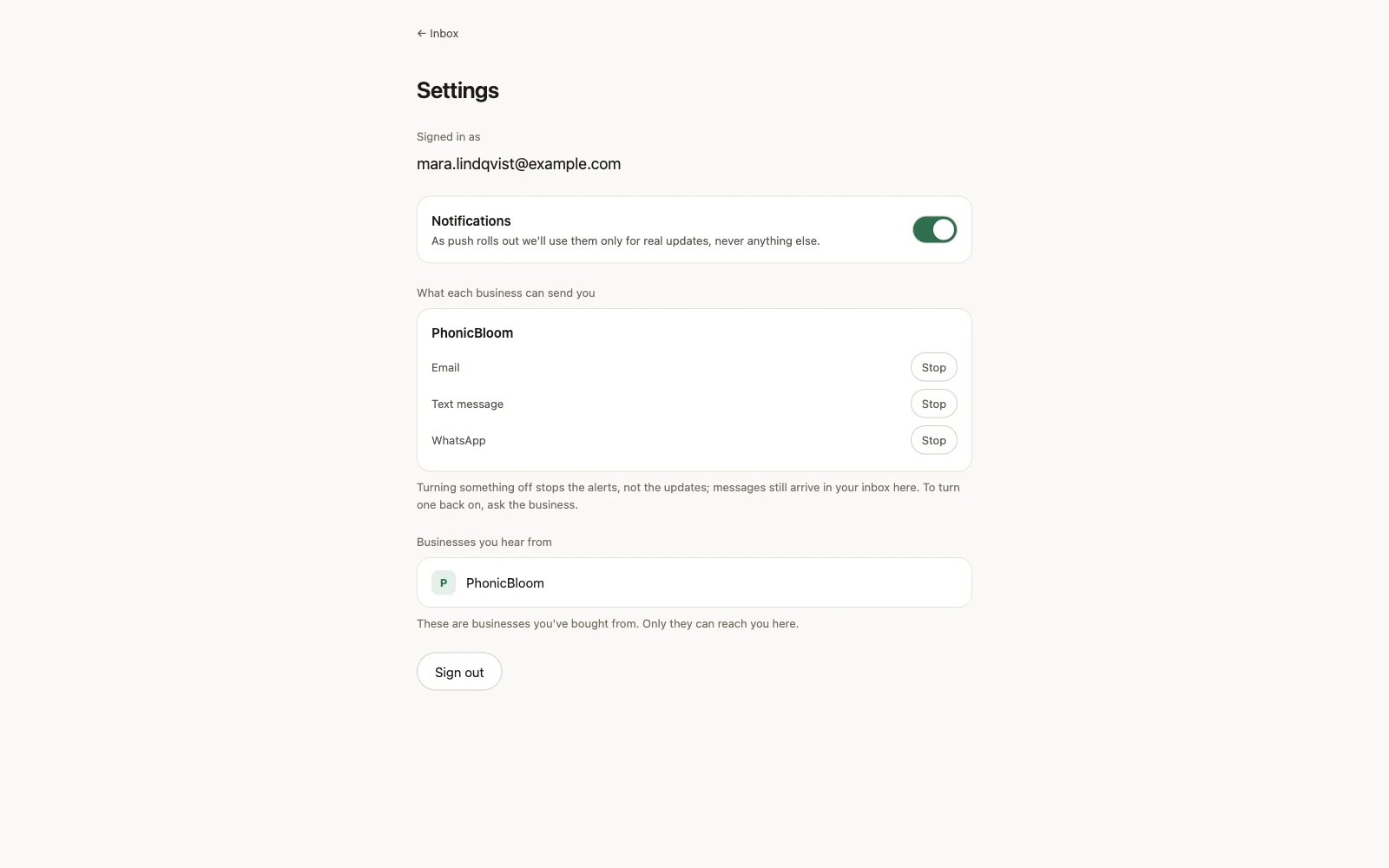
They can stop a channel for one business without affecting any other.
Stopping a channel stops the alert, not the update. The screen says so in as many words: the message still arrives in their inbox, they just are not told about it. So a customer who has silenced your texts is not a customer who has stopped hearing from you, and an update you push to them is still delivered and still readable.
Every nudge email also carries a one-click unsubscribe header, which Gmail and Yahoo both require from bulk senders and which is the reason a customer who has had enough marks you as unsubscribed instead of as spam.
What this means for what you send
Customers keep opening BeaconBox nudges because every one of them has turned out to matter. Shipping, delays, a failed payment, a change to a collection time.
Send one offer through it and you have taught that customer the nudge is skippable. There is no feature here to stop you, and the terms do not permit it; the real enforcement is that it stops working.